среда, 18 ноября 2015 г.
Materials for Unix courses
https://drive.google.com/folderview?id=0B5aSh2tKvpqDdkVQM2Uzbnp2eVE
(Yes, I needed some fast way to share link :))

среда, 7 октября 2015 г.
Userland incorporation in OpenIndiana Hipster and what does it mean for developer
Last Sunday we've published userland incorporation to /hipster-2015 repository. This was a feature long asked for by several users. It is generated by Jenkins on the build host and forces all packages generated by oi-userland build (excluding illumos-gate-provided packages and kvm) to be the latest. As we publish this incorporation on each oi-userland rebuild, you can force your system to go to specific point in the future. For example:
We can see that this system has incorporation with 20151004T163056Z timestamp installed and two more recent versions are available. So I can do something like:
to move to the 5th October package versions.
Why developers doesn't like incorporations (and IPS generally)? Because it doesn't allow you to do what you want with your system. For example, you can't install another package version.
In case of userland incorporation, you have some freedom. You can just uninstall it (and entire, as entire depends on userland-incorporation). But you can get issues during new zone setup if your NGZ misses entire. So, you have three options:
Let's look on the last option more attentively. For example, I'm going to experiment with new mesa. But userland-incorporation has the following dependency:
As you see, it is marked by facet. So you can do
Firstly, you have to install mesa version offered by openindiana.org publisher.
Update (2016-01-26). If you use your host as test station, it's easier just to uninstall userland-incorporation. Now you can do this without touching entire. Just do
$ pkg list -avf pkg://openindiana.org/consolidation/userland/userland-incorporation
FMRI                                                                         IFO
pkg://openindiana.org/consolidation/userland/userland-incorporation@0.5.11-2015.0.2.0:20151006T203007Z ---
pkg://openindiana.org/consolidation/userland/userland-incorporation@0.5.11-2015.0.2.0:20151005T203207Z ---
pkg://openindiana.org/consolidation/userland/userland-incorporation@0.5.11-2015.0.2.0:20151004T163056Z i--
pkg://openindiana.org/consolidation/userland/userland-incorporation@0.5.11-2015.0.2.0:20151004T150924Z ---
pkg://openindiana.org/consolidation/userland/userland-incorporation@0.5.11-2015.0.2.0:20151004T132353Z ---
pkg://openindiana.org/consolidation/userland/userland-incorporation@0.5.11-2015.0.2.0:20151004T122350Z ---
pkg://openindiana.org/consolidation/userland/userland-incorporation@0.5.11-2015.0.2.0:20151004T095518Z ---
....
We can see that this system has incorporation with 20151004T163056Z timestamp installed and two more recent versions are available. So I can do something like:
$ sudo pkg update -v \
pkg://openindiana.org/consolidation/userland/userland-incorporation@0.5.11-2015.0.2.0:20151005T203207Z
to move to the 5th October package versions.
Why developers doesn't like incorporations (and IPS generally)? Because it doesn't allow you to do what you want with your system. For example, you can't install another package version.
In case of userland incorporation, you have some freedom. You can just uninstall it (and entire, as entire depends on userland-incorporation). But you can get issues during new zone setup if your NGZ misses entire. So, you have three options:
- stay with old entire, which doesn't depend on userland-incorporation (pkg freeze it);
- uninstall entire and userland-incorporation;
- use facets to relax incorporate dependencies.
Let's look on the last option more attentively. For example, I'm going to experiment with new mesa. But userland-incorporation has the following dependency:
$ pkg contents -m userland-incorporation |grep mesa
depend facet.version-lock.x11/library/mesa=true fmri=x11/library/mesa@10.5.9,5.11-2015.0.1.0:20150927T212600Z type=incorporate
As you see, it is marked by facet. So you can do
$ sudo pkg facet facet.version-lock.x11/library/mesa FACET VALUE SRC version-lock.x11/library/mesa True system $ sudo pkg change-facet facet.version-lock.x11/library/mesa=false $ sudo pkg install pkg://userland/x11/library/mesa $ sudo pkg info mesa Name: x11/library/mesaBut beware, if you would like to change facet back, you can't do it:
Summary: The Mesa 3-D Graphics Library
Category: System/X11
State: Installed
Publisher: userland
Version: 11.0.2
Branch: 2015.0.1.0
Packaging Date: October 7, 2015 03:00:58 PM
Last Install Time: October 7, 2015 06:49:24 PM
Size: 34.82 MB
FMRI: pkg://userland/x11/library/mesa@11.0.2-2015.0.1.0:20151007T150058Z
Project URL: http://www.mesa3d.org/
Source URL: ftp://ftp.freedesktop.org/pub/mesa/11.0.2/mesa-11.0.2.tar.xz
$ sudo pkg change-facet version-lock.x11/library/mesa=true
Creating Plan (Solver setup): /
pkg change-facet: Package entire must be uninstalled before the requested operation can be performed.
  Reject:  pkg://openindiana.org/entire@0.5.11-2015.0.2.1:20151003T221212Z
  Reason:  No version matching 'require' dependency consolidation/userland/userland-incorporation can be installed
Package x11/server/xorg/driver/xorg-video-ati must be uninstalled before the requested operation can be performed.
  Reject:  pkg://openindiana.org/x11/server/xorg/driver/xorg-video-ati@6.14.6-2015.0.1.0:20150927T212825Z
  Reason:  No version matching 'require' dependency x11/server/xorg@1.14.7-2015.0.1.0 can be installed
    ----------------------------------------
    Reject:  pkg://openindiana.org/x11/server/xorg@1.14.7-2015.0.1.0:20150927T184317Z
    Reason:  No version matching 'optional' dependency x11/library/mesa@7.4.4-2014.1.3.0 can be installed
      ----------------------------------------
      Reject:  pkg://userland/x11/library/mesa@11.0.2-2015.0.1.0:20151007T150058Z
      Reason:  This version is excluded by installed incorporation consolidation/userland/userland-incorporation@0.5.11-2015.0.2.0
      ----------------------------------------
    ----------------------------------------

.....
Firstly, you have to install mesa version offered by openindiana.org publisher.
Update (2016-01-26). If you use your host as test station, it's easier just to uninstall userland-incorporation. Now you can do this without touching entire. Just do
$ sudo pkg change-facet facet.require.consolidation/userland/userland-incorporation=false
$ sudo pkg uninstall userland-incorporation
пятница, 2 октября 2015 г.
Don't think for me...
I really like OpenVZ and Proxmox. But what I hate is programs which try to think for me. For example, we have /var/lib/vz and subdirectories on ZFS. If by chance it was not mounted on system startup, OpenVZ creates subdirectories in /var/lib/vz/template. Next time ZFS filesystem containers/vz/template just will not be mounted on non-empty /var/lib/vz/template. And you discover it only during runtime. If OpenVZ just threw error on startup, it would be better. If ZFS just silently mounted filesystems over non-empty directories (as usual mount does), it would be better. But two subsystems try to think for me and make my life better. I hate programs being so smart...
четверг, 23 июля 2015 г.
On attaching zones and linked images
Recently updated IPS was added to OI and it caused some inconvenience to developers. The most annoying "feature" is caused by publisher check: NGZ first several publishers should be the same as GZ's publishers and their stickiness should match.
OK, I've set the publishers according to this rule, but today was surprised by fact that I can't longer set openindiana.org publisher to be non-sticky in NGZ. I've set openindiana.org publisher to non-sticky in GZ, NGZ, but still IPS complains on "pkg install":
pkg install: Invalid child image publisher configuration. Child image publisher
configuration must be a superset of the parent image publisher configuration.
Please update the child publisher configuration to match the parent. If the
child image is a zone this can be done automatically by detaching and
attaching the zone.
The parent image has the following enabled publishers:
PUBLISHER 0: openindiana.org
PUBLISHER 1: userland (non-sticky)
The child image has the following enabled publishers:
PUBLISHER 0: openindiana.org (non-sticky)
PUBLISHER 1: userland (non-sticky)
PUBLISHER 2: hipster-encumbered
I've rechecked. Both GZ and NGZ had openindiana.org publisher set to non-sticky. I've followed IPS advice - detached and attached zone. And zone attach -u failed with the same error.
OK. Time for black magic. I've unset userland publisher. Set GZ and NGZ publisher list only to openindiana.org (non-sticky). The same issue - IPS doesn't see that GZ publisher is non-sticky now. So, I concluded that information about parent image is recorded or cached in some local zone configuration file. Looked at zone's /var/pkg and found /var/pkg/linked/linked_ppubs, which listed [["openindiana.org", true], [userland, false]]. I changed this file to [["openindiana.org", false]] and after that could attach zone.
I think I still doesn't understand as linked images work (or should work), but they are starting annoying me...
OK, I've set the publishers according to this rule, but today was surprised by fact that I can't longer set openindiana.org publisher to be non-sticky in NGZ. I've set openindiana.org publisher to non-sticky in GZ, NGZ, but still IPS complains on "pkg install":
pkg install: Invalid child image publisher configuration. Child image publisher
configuration must be a superset of the parent image publisher configuration.
Please update the child publisher configuration to match the parent. If the
child image is a zone this can be done automatically by detaching and
attaching the zone.
The parent image has the following enabled publishers:
PUBLISHER 0: openindiana.org
PUBLISHER 1: userland (non-sticky)
The child image has the following enabled publishers:
PUBLISHER 0: openindiana.org (non-sticky)
PUBLISHER 1: userland (non-sticky)
PUBLISHER 2: hipster-encumbered
I've rechecked. Both GZ and NGZ had openindiana.org publisher set to non-sticky. I've followed IPS advice - detached and attached zone. And zone attach -u failed with the same error.
OK. Time for black magic. I've unset userland publisher. Set GZ and NGZ publisher list only to openindiana.org (non-sticky). The same issue - IPS doesn't see that GZ publisher is non-sticky now. So, I concluded that information about parent image is recorded or cached in some local zone configuration file. Looked at zone's /var/pkg and found /var/pkg/linked/linked_ppubs, which listed [["openindiana.org", true], [userland, false]]. I changed this file to [["openindiana.org", false]] and after that could attach zone.
I think I still doesn't understand as linked images work (or should work), but they are starting annoying me...
вторник, 31 марта 2015 г.
Hipster 2015.03 is here
We released our last snapshot ISO almost half a year ago. I believe, you want something new. You'll get it. New ISOs were just uploaded to dlc server. Let's see what has changed.
First of all, most evident changes were made in desktop area. We've updated Xorg server and libraries, which allowed us to incorporate some important security fixes from Oracle x-s12-clone and Debian Xorg. Also we've moved much more closely to Gnome 2.32. Most packages were updated to this level, excluding packages which either have a lot of specific patches (like gdm) or just dropped some significant functionality (like cheese, which dropped HAL support in version 2.32). Not everything has gone smoothly. We had to drop trusted desktop support during update. I believe nobody seriously used it under OI. The most annoying thing is that updated Xorg and Intel driver require some DRM updates, which are still not ready. So, if you have Intel video card, either pkg freeze X-incorporation and xorg, or use vesa driver.
General system changes
All Sun Studio-compiled C++ libraries were removed from the system. The libraries were published in their current form to http://dlc.openindiana.org/c++-libs/,
so you can grub necessary libraries and LD_PRELOAD them or use in
alternative path if necessary. All X/g++/Y packages are renamed to X/Y
and moved from /usr/g++ to /usr. We continue delivering
system/library/c++/sunpro for the foreseeable future.
Text installer
was changed to install OI on EFI-labeled disk by default. Note, in this
case the entire disk is erased. If you want to install OI on
MBR-labeled disk, choose partitioned install.
Desktop software and libraries
- A lot of desktop libraries were updated
- GTK2 is updated to 2.24.27
- libdrm is updated to 2.4.58
- libX11 is updated to 1.6.2, xcb support is enabled in libX11
- xf86-video-ati driver updated to 6.4.16
- nvidia proprietary driver was updated to 340.76
- Mesa is updated to 10.5.1
- Xorg is updated to 1.12.4. This requires updating xorg drivers and modules. OI-shipped modules will be updated automatically, but if you use VirtualBox, you'll have to update your guest additions to at least 4.3.22 version.
- Glib2 is updated to 2.43.4
- Enlightenment 0.19.3 is added as alternative desktop environment
- fontconfig was updated to 2.11.1
- libid3tag and libmtp were imported from SFE, gmtp is added
- rdesktop is updated to 1.8.3
- transmission is updated to 2.52
- XScreensaver is updated to 5.32
- gnome-commander is updated to 1.4.5
- QT 4.8.6 is added
- emacs is updated to 24.3
Input Method Selector was added from upstream input-method gate. Bug in svc:/application/desktop-cache/input-method-cache:default service preventing correct input methods functioning in recent OI was fixed. In fact, gtk input modules cache was moved from /etc/(amd64/)gtk-2.0/gtk.immodules to /usr/lib/(amd64/)gtk-2.0/2.10.0/immodules.cache and service has to regenerate these cache files in new locations . So, after update you can safely remove /etc/(amd64/)gtk-2.0/gtk.immodules.
Development tools
- Subversion is updated to 1.7.19
- SQLite is updated to 3.8.8.3
- Python 3.4 is updated to 3.4.3
- Binutils are updated to 2.25
- OpenBLAS 0.2.13 is added
- Mercurial is updated to 3.3
- Ruby 1.9.3 is added
- Ruby 1.8 is marked obsolete, all OI software is switched to Ruby 1.9.3
- Ruby 2.2.1 is added
- Curl is updated to 7.39
- libncurses.so links are moved to /usr/lib(/amd64)
- gawk is updated to 4.0.2, this fixes issues with pkgsrc bootstrap
- MPICH is updated to 3.1.3
- Sun Studio indent in /usr/bin was replaced by GNU indent. Old one is preserved in /opt/sunstudio12.1/prod/bin/indent
Server software
- A lot of packages were updated, including apache 2.4, php 5.4, php 5.5, postgresql 9.3, samba 3.6, mariadb 5.5
- PostgreSQL 9.4 is added
- PostgreSQL 8.4 is marked obsolete
- ISC dhcp server is updated to 4.2.7
- BIND DNS server is updated to 9.9.6-P2
- rsyslog is updated to 7.4.10
- NTP is updated to 4.2.8p1
As always, we are proud to deliver to you latest illumos-gate bits.
There's also a lot of security fixes and small bug fixes.
Of
course, I had more ideas than spare time, so some of them were not
implemented. We still don't have PHP 5.6 and our OpenOffice package
still doesn't work with XML-based document formats. I've looked at
replacing cpp with one based on Schilix version, but unfortunately I
found it to be not always compatible with Sun cpp. So, I've chosen
preserve the status quo and we still deliver Sun cpp. I still would like
to see postfix as first class MTA in OI.
I'd
like to share some more ideas, which attract me now. First of all, we
consider further updating of Xorg and other former xnv components
(libXfont, freetype). GCC update is also on the roadmap. Our old samba
and cups versions, dependency on python 2.6 and ageing Perl 5.16 make me
sad. Of course, I'd like to see PHP 5.6 in oi-userland and perhaps
even look at hhvm.
понедельник, 17 ноября 2014 г.
Trip to Japan. Part one - Tokyo
So, I've finally returned from Japan. I'd like to share my "road-diary". I need some time to arrange my records, so I'll split them in several parts.


Day 1
First day in the way. I'm going to Moscow as there's no direct flight to Tokyo. RZD surprised me giving ticket for 37 place in the car where there were only 36 places. In such way they sell places in conductor's compartment. Another pleasant surprise was that I had a ticket with included dinner. However, I haven't understood why they brought cake before chicken...
Day 2
One more day in the way. Moscow is as always crowded. After waiting for about 6 hours for my plane in Domodedovo and 9 hours night flight I'm feeling sleepy.
Funny case in the plane. I've ordered tea. Got a bottle of gin. Asked "is it a tea?". Got reply, yes, this is tea. Hm… At home I'd like such tea, but in the road I'd like to avoid drinking alcohol. Luckily, another stewardess understood me better.

Day 3
The morning begun sharply and suddenly with Sun blinding me from the . window. The weather was perfect. I saw blue ocean and green land. I had to fill two blanks for foreigners and was afraid that I've done something wrong. However, custom officer just looked that all fields are filled and asked for the intended duration of my stay in Japan.

As for yens, we changed money in the airport. 1 dollars is roughly equivalent to 105 yen. To convert prices from yens you can divide by 100 and get price in dollars (or by 2.5 and get prices in roubles).
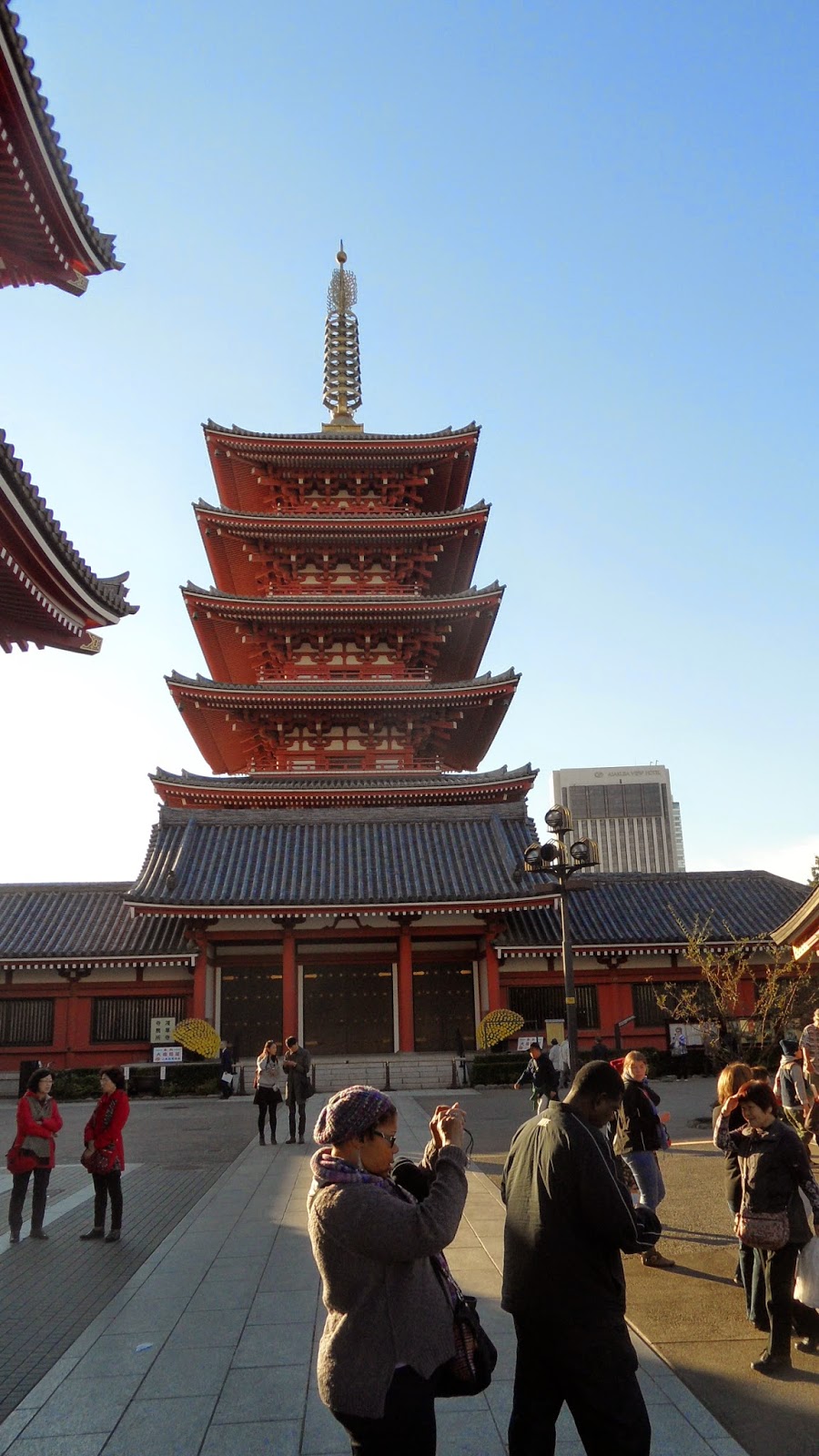
The first shock is that not everyone speaks English. Expected, but unpleasant. Luckily, even when people don't understand you, they always try to help. But more on this later. Now we were moving to the Tokyo television tower. Precisely, to the Buddhist temple by the tower. They say that the tower itself was constructed as a copy of Eiffel Tower. Don't know, it seems similar, but different at the same time.

There was a concert in front of the main temple, so we entered smaller one. Today is a Culture day and at the same time the birthday of Meiji Emperor (the one who like Peter the Great in Russia cut a window through to Europe for Japan). We've visited service in the temple. Buddhists are practical people - if you pay for the service, the monks will held one for you even if you are not a Buddhist. I've took a picture of the place where people tie ribbons with monks guidances. All predictions, guidances, amulets are valid only till the end of the year. You have to return them to the temple till the end of December and get new ones in January.

There are also statues in temple's garden. You can order one for you. This statue is devoted to the childrens of your family. You should dress them in caps, bring them toys and candles for your children to prosper. Periodically caps and toys are renewed. Statues stay in the temple's garden forever.
And burial urns in the local cemetery - no. You should pay significant rent for the monument on it. Each monument holds several urns, perhaps, for the whole family. If no one pays a rent, the place is sold and urns are transferred to the common store inside the temple. On the photo you can see some ski-like sticks. They mark the number of prayers which were held for the dead.


There are also shogun graves in this cemetery. But this part of cemetery is opened for visitors only once per year. In the common part of the cemetery there is one outstanding tomb - the tomb of Emperor's wife who tried to prevent bloodshed between 14th shogun and Emperor in 19th century, when Emperor brought back true power from shoguns.

The last part of the day was devoted to visiting thermae. As I don't like public baths, I just read the book in the common place ahead of baths. Japanese in kimono look nice. But I think it wouldn't suit me :)
A real surprise was non-european sockets. And lavatory pan with a dozen of buttons (it was hard to find out the main one :).
In the evening I've went to Indian Cafe. Interesting experience. I've ordered meat with spinach. When I got it there were more spices than meat. Seriously, I firstly thought that it was some sauce for the meat…
After buying a phone charger found interesting device in the hotel room - a charger for everything (this device has a lot of connectors for every gadget). Unluckily it didn't suit to my camera and I had to ask for Japanese-European adapter at hotel registry.
Day 4
In the morning we went to fish market. The main fish is tunny. The largest part of fish are sold in the morning, starting from 4 a.m. to the large customers. Later, starting from 8 a.m. small quantities of fish are sold to local restaurants. You can see a lot of customers in the market in the morning. I expected to see more fish, but it seems not all fish is shown on the counter. However, there are some exotic goods - crabs, calamars, seaweed.


Then we visited garden near Emperor's palace. However, we were not allowed to enter deep into the garden, because there were some officials in the palace.
So, we went to Shinto shrine. We were lucky enough to see traditional marriage. Also, near the temple, we saw girls in traditional costumes. At some age girls should be blessed in the temple. This particular temple was devoted to Meiji Emperor. Near the temple there are two lines of barrels for Sake and wine. On the barrels there are labels of wineries which make donations to the temple.


Later we were visiting viewpoint at the 45th floor of some administrative building. They say the design of the building was inspired by Notre Dame de Paris. And they plainly have something common.
After dinner we were brought to one more temple (this time Buddhist). On the ceiling of the temple you can see the dragon fulfilling wishes of the congregation.

Then we visited tea ceremony. My groupmates were whining that it was too long. But I liked it - at last something national and colorful.
In the evening I joined several groupmates and we were walking along Ginza. One of them was citing the poems she wrote. They seem rather nice.
Day 5

In Tokyo we were staying in Grand Prince Hotel Takanawa. Really nice hotel. It has a beautiful park. The park even has a pond with big and vivid fish. There is a small Buddhist chapel in the park.

Today we went to some lake by Mount Fuji. The view is picturesque, but today is rather cold here. Why we were sailing across the lake, I became frozen. The ship we were sailing at was made in some medieval style - with sails and cannons. There even were some pirates on the ship which begged money for making photos with them. During our journey I saw several shrines and temples on the banks of the lake. I tried to find some alcohol in nearby shops, because was frozen, but without any luck. Only when we went up by rope-way, I had some luck in finding sake.
We saw the valley of geysers. Local people boil eggs in their water. As water contains a lot of iron, the eggs become black (only the shell, the egg itself is usual). They say that such egg prolong your life by 7 years. Don't know, I haven't eaten it. The eggs are sold to tourists in any forms: the eggs themselves, the toys in form of eggs, the chocolate in form of eggs and so on.

The next stop on our way was at the house of geishas. A strange art. I can't understand what they study for 20 years. But resulting performance is beautiful. However, the music is a bit mournful (reminds me of Mongolian music).
The last point of our program for today was one more public baths. As I don't like it, I walked by the nearest village. The village itself resembles my mother's homeland. There are buildings on both side of the road. Small houses - hotels, museum. Mountains surround the village. Pine trees grow surround the route. The difference is that there are much more trees and expensive cars on the road.
On the way back the guide has told us about life in Japan. I don't like to live such life: marriage matchmaking, working 24 hours per day, wifes manage the house. There are no free high education. Scholarship should be returned after graduating. And, of course, Russian girls are prettier :)
понедельник, 13 октября 2014 г.
There and back again
Once upon a time in a galaxy far far away there has been OpenSolaris distribution. This was the first Unix-like desktop which allowed me to completely replace Windows on my desktop. It wasn't perfect, but a magic of ZFS and IPS made it very attractive. As we now, the sun sets... So, with the end of OpenSolaris era I've moved to FreeBSD and has never regretted about it.
But I always liked illumos and was interested in OpenIndiana distribution. So, now, when I seem to be one of the last interested in it, I tried to go back. Really, migration was smooth. I've bought Nvidia GeForce 740-based video adapter, 4 more GB of RAM and after this I was sure that my hardware is supported by OI.
OI could recognize FreeBSD ZFS pool, so I've detached one disk from zpool, installed OI Hipster from October ISO, imported data and looked at software. As always, software choice for OI if you don't want to compile it yourself is not wast. Yes, there are pkgsrc builds, but they seems foreign in IPS world. So, I used sfe and sfe-encumbered repositories for OI /dev. I hope to use vlc, but vlc 1.1 from sfe-encumbered was a complete garbage. It didn't want to play anything or when it played something it was awful (like no sound or no video or no navigation in DVD menu...) So I stopped on totem/rhythmbox combination and used additional gstreamer codecs from sfe-encumbered. This works, however you should set sfe-encumbered before sfe in your publisher's list.
When speaking about OI one should mention IIMF/IIMD and other IIIM shit. Luckily, it can be turned off. I've finished just adding setxkbmap command to the list of startup applications.
Unfortunately, our Apache OpenOffice from /hipster is still buggy, so I had to use one from AdfinisSyGroup. VirtualBox 4.3.18 from Oracle for Solaris/x64 works fine. I was pleased with our Firefox 24.8.1. Adobe flash plugin 10.1 r85 sometimes crashes. Especially annoying is that it crashes on the flash games which I have to support. At least I've expected that it would not work - the application require Flash 11+. But for other use cases it works. Having working evince, xchm and FBreader seems enough to read documentation. zpool resilvering has completed by 50%. So, now I'm eating my own dog's food.
Подписаться на:
Сообщения (Atom)