четверг, 16 февраля 2017 г.
Enterprise Information systems
This year I'm going to read "Enterprise Information systems" course for students of Southern Federal University Institute for Advanced Technologies and Piezotechnics.
The materials of this course will be appearring in this Microsoft Class Notebook
Google docs link

пятница, 21 октября 2016 г.
Sending SMS notifications from OpenIndiana zone with Huawei E1550
I want to receive SMS notifications when something is terribly wrong in our data center. One part of the problem is OpenNMS, and we know how to configure it. But another part is actually sending SMS.
As only physical server with normal USB ports which we have is self-assembled SuperMicro storage, running OpenIndiana, we want to create OI zone, which can send SMS. First of all, we'll need some USB modem. I use Huawei e1550, which was already switched to modem-only mode (AT^U2DIAG=0) on Windows PC. Let's look at prtconf -v (looking for HUAWEI):
     device, instance #0
                    Driver properties:
                        name='pm-components' type=string items=3 dev=none
                            value='NAME= usbsacm0 Power' + '0=USB D3 State' + '3=USB D0 State'
                    Hardware properties:
                        name='driver-minor' type=int items=1
                            value=00000000
                        name='driver-major' type=int items=1
                            value=00000002
                        name='high-speed' type=boolean
                        name='configuration#' type=int items=1
                            value=00000001
                        name='usb-product-name' type=string items=1
                            value='HUAWEI Mobile'
                        name='usb-vendor-name' type=string items=1
                            value='HUAWEI Technology'
                        name='usb-raw-cfg-descriptors' type=byte items=85
                            value=09.02.55.00.03.01.03.e0.fa.09.04.00.00.03.ff.ff.ff.00.07.05.81.03.40.00.05.07.05.82.02.00.02.20.07.05.01.02.00.02.20.09.04.01.00.02.ff.ff.ff.00.07.05.83.02.00.02.20.07.05.02.02.00.02.20.09.04.02.00.02.ff.ff.ff.00.07.05.84.02.00.02.20.07.05.03.02.00.02.20
                        name='usb-dev-descriptor' type=byte items=18
                            value=12.01.00.02.00.00.00.40.d1.12.01.10.00.00.02.01.00.01
                        name='usb-release' type=int items=1
                            value=00000200
                        name='usb-num-configs' type=int items=1
                            value=00000001
                        name='usb-revision-id' type=int items=1
                            value=00000000
                        name='usb-product-id' type=int items=1
                            value=00001001
                        name='usb-vendor-id' type=int items=1
                            value=000012d1
                        name='compatible' type=string items=3
                            value='usb12d1,1001.0' + 'usb12d1,1001' + 'usb,device'
                        name='reg' type=int items=1
                            value=00000006
                        name='assigned-address' type=int items=1
                            value=00000003
If modem was switched to modem-only mode, you'll see
value='usb12d1,1001.0' + 'usb12d1,1001' + 'usb,device'in 'compatible' field.So, let's say OI that it should use usbsacm to talk to it:
# update_drv -a -i 'usb12d1,1001' usbsacm
Now you should have /dev/term/0 - 3 devices and can use tip to talk to /dev/term/0:
# tip /dev/term/0
connected
AT
OK
~^D
Let's create zone and pass /dev/term/0 to the zone:
# zonecfg -z  sms1
sms1: No such zone configured
Use 'create' to begin configuring a new zone.
zonecfg:sms1> create
zonecfg:sms1> set zonepath=/zones/sms1
zonecfg:sms1> set brand=ipkg
zonecfg:sms1> set autoboot=true
zonecfg:sms1> set ip-type=exclusive
zonecfg:sms1> add net
zonecfg:sms1:net> set physical=sms10
zonecfg:sms1:net> end
zonecfg:sms1> add device
zonecfg:sms1:device> set match=/dev/term/0
zonecfg:sms1:device> end
zonecfg:sms1> exit
# zfs create data0/zones/sms1
# zoneadm -z sms1 install
# zoneadm -z sms1 boot
Now we can configure network in our zone:
# zlogin sms1
# ipadm create-if sms10
# ipadm create-addr -T static -alocal=192.168.1.2/24 sms10/v4
# route add -p -net 0 192.168.1.1
# cp /etc/nsswitch.dns /etc/nsswitch.conf
# echo 'nameserver 8.8.8.8' >  /etc/resolv.conf
# svcadm enable dns/client
We'll use gammu utilities to send sms:
# pkg install utility/gammu
Your /etc/gammurc (or ~/.gammurc) should look like:
[gammu]
device = /dev/term/0
connection = at
If everything is fine, now you can send SMS:
# gammu sendsms TEXT +7myphone -text "test"
воскресенье, 8 мая 2016 г.
My Crimea trip (April-May 2016)
This time I had little time to plan my holidays. So, I didn't have time to get Visa. After repairing my flat, I also didn't have a lot of money, and tried to find something interesting and cheap. Luckily, my travel agent advised me a trip to Crimea. I was frightened by long bus road, but plain tickets costed almost as all trip, so decided, why not and went to Alushta by bus. I tried to make some notes during the trip, they are presented later.
When we finally left Azov, driver turned on a film, which killed me with its stupidity. Luckily, the DVD disk was damaged, and we didn't have to watch all the film. There's no good light in the bus, so I can't read my book. But I can hear loud conversations of patriotic company which drink cognac on the backseat of the bus. So I'm listening to Frank on my phone and hope that it will not discharge too soon.
Ferry… Passenger control was surprisingly fast, but our bus registration took some time. So the overall process took about 2.5 hours. One interesting thing I've seen while waiting for the bus registration is boarding of railway oil tanks boarding the ferry.
 First stop is Nikitsky botanical garden. The park is big and beautiful. But there's no any salt, which would impressed me (like Japan maples). Perhaps, I'm just too sleepy.
 After visiting the garden, we hurry to Massandra palace, a former dacha
of Russian monarchs (and recreation place for general secretaries). The
palace looks really fine, however it would benefit from some
restoration. Inside the palace everything is similar to other palaces in
St. Petersburg or Vienna. I can't expect that a man can comfortably
live there, it's too luxurious (and boring).
After visiting the garden, we hurry to Massandra palace, a former dacha
of Russian monarchs (and recreation place for general secretaries). The
palace looks really fine, however it would benefit from some
restoration. Inside the palace everything is similar to other palaces in
St. Petersburg or Vienna. I can't expect that a man can comfortably
live there, it's too luxurious (and boring).


 In the morning we are going to Livadia palace. I liked it. It's very light, big and decorated with taste. As I understood, it was finished in the end of 19th century, and Nikolay II liked to spend his spare time there. During excursion we were told about this intelligent, almost saint, tsar… But he seems more like miserable tsar. Lost Russian territories, allowed country to fall apart and was killed by his own nation… Not a bright figure for an emperor. Nikolay had the largest private collection of cars in Europe.. and especially high rate of illiteracy in the country. They say he liked to rest in Yalta, make photos. Kodak has presented him special camera to make panoramic photos. The photos of his family are exhibited in the palace.
 In the palace there's also an exhibition devoted to the Yalta conference. The palace itself was given as residence for Roosevelt. There's a copy of "Pravda" newspaper of 1945 with printed decisions of the conference. You can see a sculpture of Churchill, Roosevelt and Stalin near sanatorium, which is situated nearby. It wasn't placed near the palace, as it's too heavy for this place.
 There is a pathway which starts near the palace. Originally it was used by tsar's family. Now it leads to the Lower Oreanda Resort. This resort was used by Central Committee of the CPSU members and especially honoured men. Almost every Russian actor, a lot of writers were here. Even Korolev visited this place. The pathway is really cool. It looks like similar pathways in Kislovodsk's parks, only surrounded with southern exotic plants. I'd like to spend there more time, but as always we were in a hurry. So we ascended to the arc in the hills, and then descended to the mentioned resort. The road down is rather steep, so it was interesting.
 Near this resort there's a church. A priest who serves there is famous in Crimea. He writes theological and philosophical books. Also he is known, because he doesn't require payments for his wedding and memorial services.
After visiting Resort's park there was a concert of church choir music. As I barely could withstand this, I spent this time walking in the park, which looked lovely.
 We were going back to the bus along the same pathway. The pathway is called "Sunny path" and to justify this name, sundial was placed near the path. However, it never shows true time and serves only as decorative element.
In the evening I forgot a packet with food in the bus, so I had to go walking, searching for a cafe. I've walked along the beach, but all cafes there were still closed or were not very attractive. Finally I've chosen one with adequate prices and interesting interior - guns, steering wheels, bear's skins. Food was delicious, but music was awful. As it was live music, they even included some margin for it in the bill. It wasn't high, but I'd prefer to pay it to these musicians for silence, not for their music.

 After breakfast we were going to the Vorontsov Palace. In the road the guide talked us about count Vorontsov. It was one of the richest russians of his time. But unlike modern Russian thiefs oligarhs, he spent a lot of own money on the state business - he built roads and developed cities. When after battle he lost most of his 9000 soldiers, he rebuilt one of his estates into the hospital and all of his remaining wounded soldiers were nursed there. When they recovered, he paid them significant rewards and gave everyone a fur coat (it was in winter). He has even sold another estate to cover the costs of carousing hussars in Paris when our troops were leaving it after first Patriotic War...


 In any case, his palace is great. It looks like a Medieval castle, and is made from semiprecious material. And of course, white lions are majestic. There's an English park beyond his palace, with pounds, swans and so on… It's evident that this palace was created by one of the richest man in Russian Empire. They say, Nikolay I was angry when saw this palace, as it was more beautiful than his own palaces. But the next morning he pardoned Vorontsov and asked him to oversee the building of Emperor palace nearby (Livadia palace). By the way, Vorontsov Palace was Churchill's residence during Yalta conference. It's not a big surprise, as this place resembles European castles.
 After the palace we went to the Swallow's Nest. This castle was sold several times. His last owner before the Revolution was some merchant, who wanted to make a restaurant there. In Soviet era, the castle was in pity state. It needed reconstruction. Some works were made in the mid of the century, and it was transformed into museum. Several films were shot there, including "Ten Little Niggers". Ukrainian government leased this palace to Italian company, who tried opened restaurant. They didn't know the history. After several years Ukrainian president voided the contract and turned palace into museum again. He even repaired it for state's money. They say he wanted to privatize the palace, but didn't have time to finish with his plans, as Maidan has happened. Now it's a museum again.
From Swallow's Nest we went by small ship to Yalta. In Yalta we had some free time. I even managed to have a decent dinner there for ~ 2 euro. While walking along the seafront, I've seen several concerts - they were held on the stages under clear sky. There were a lot of publice there. Some of them tried to get their money, lending different exotic personal vehicles, forcing you to take a picture with their animals or playing violins. Lively place. I was fond of several pairs of old men, playing chess on the benches. A man managed to do check-mate in 6 moves from situation, which didn't foretell it in any way.
In the evening I walked from the hotel in the direction opposite to the city center. Saw several pictures in Stalker style - abandoned children recreation centers, rusty satellite antennas, abandoned wagons…
 At 7 o'clock we left for Sudak. During our way guide talked about Alans, Greeks, Genoeses, Tatars, Turks and other nationalities, living in Crimea in different times. She even read some poems. Churches and mosques were seen along our way. In 1945 a lot of tatars were deported from these lands, and all original titles were changed in one night. So town names like Perevalnoe, Svetloe, Pionerskoe appeared. The Tatars in awful conditions, in goods wagons, were transferred to Kazakhstan.
 Sometimes we see monuments to partizans. They created a lot of troubles for fascists, but also often died. Germans burned and cut down forest, trying to secure roads for their transports, but everything was in vain.

 First event for today is Genoese fortress. However, earlier it was Byzantine fortress, and before this it was Alanian fortress. Looks great. The spirit of the place a bit resembles Tanais ruins. I'd gladly walked here for half a day, but we have only one hour. Almost whole or well reconstructed towers, walls, battlements. Hipster-style guide gives us brief information about different fortifications in the fortress. There is an interesting building in the fortress. It's a mosque, which was built by Turks, who one day came here. When they left, it became Catholic church. Later it was used as sinagoga by local Jews. This holy place now is a museum. You should appreciate that internal area of the fortress housed a small city. There were not enough Genoeses here to defend such big fortress, so during hard times either militia was used, or people have to live the fortress and the city and hide in the forest.
 Next stop is vine cellars of "Solnechnaya Dolina" vine plant. The plant produces a lot of vines, and we are told how vine is made. They say, the cost of one oak barrel for vine is about 1000 euros. If it's just cost of empty barrel, how much will full barrel cost? The cellars were founded in the end of XIX century by Golitsyn, but changed their owners rather often. Local people managed to steal vine, using ventilation holes, so in middle of the century they were locked with bars. The cellars successfully survived WWII, because one of the German high officers liked winemaking and wanted to grab the plant, but you know the history. Now plant produces a lot of vines, the main brands include "Black doctor" and "Black colonel". I wanted to get "Black doctor", as my friend liked his cheap replica, but it costed as 4-5 bottles of Abkhazian wines, so I stopped on portvein, which was cheaper.
As I forgot to buy any food during the day, I have to buy "Snickers" for the cost of the second course in the canteen where I usually eat. Another impressions on the ferry are related to the ferryboat itself. It looks grandiosely. It was interesting that ferryboat does two turns during its way so that it lands with its back part…
I still haven't seen a lot in Crimea, and I'd like to go back and visit Sevastopol and Bakhchysarai, to spend several days on the sea shore.
If you decide to go there, don't forget that for now it seems only MTS mobile services work there. Also several men in our group had issues with their credit cards, so don't forget to get cash. Luckily, you'll not need a lot of money there.
Day 1. The road
What can you expect from bus tour to Crimea for 170 euros? Everything is possible. In the beginning we found out that bus has opaque windows and malfunctioning microphone. Also one of the drivers forgot his documents, so we stayed in Azov for 2 hours waiting for another bus. So we walked in Azov city park for some time. After leaving park we had to wait some more time on the road. So at last we left Azov at 7-8 in the evening.When we finally left Azov, driver turned on a film, which killed me with its stupidity. Luckily, the DVD disk was damaged, and we didn't have to watch all the film. There's no good light in the bus, so I can't read my book. But I can hear loud conversations of patriotic company which drink cognac on the backseat of the bus. So I'm listening to Frank on my phone and hope that it will not discharge too soon.
Ferry… Passenger control was surprisingly fast, but our bus registration took some time. So the overall process took about 2.5 hours. One interesting thing I've seen while waiting for the bus registration is boarding of railway oil tanks boarding the ferry.
Day 2. Alushta. Nikitsky botanical garden. Massandra palace
So, we still in the road. I hope I'll be able to sleep at the hotel. Vain hope. I've just managed to unpack my bag, take a shower and take a breakfast. And back to the bus. First stop is Nikitsky botanical garden. The park is big and beautiful. But there's no any salt, which would impressed me (like Japan maples). Perhaps, I'm just too sleepy.
 After visiting the garden, we hurry to Massandra palace, a former dacha
of Russian monarchs (and recreation place for general secretaries). The
palace looks really fine, however it would benefit from some
restoration. Inside the palace everything is similar to other palaces in
St. Petersburg or Vienna. I can't expect that a man can comfortably
live there, it's too luxurious (and boring).
After visiting the garden, we hurry to Massandra palace, a former dacha
of Russian monarchs (and recreation place for general secretaries). The
palace looks really fine, however it would benefit from some
restoration. Inside the palace everything is similar to other palaces in
St. Petersburg or Vienna. I can't expect that a man can comfortably
live there, it's too luxurious (and boring). Day 3. Livadia palace. Lower Oreanda Park
Ufff. It's cold. Terribly cold. I couldn't turn on conditioner in heating mode, so had to sleep under 3 blankets. It's about 10 degrees outside. But under 3 blankets it's warm enough. Of course, there's no any central heating in this summer hotel. In the morning hotel staff explained me that air conditioner remote buttons should be pressed harder and helped to turn on air conditioner in heating mode.

 In the morning we are going to Livadia palace. I liked it. It's very light, big and decorated with taste. As I understood, it was finished in the end of 19th century, and Nikolay II liked to spend his spare time there. During excursion we were told about this intelligent, almost saint, tsar… But he seems more like miserable tsar. Lost Russian territories, allowed country to fall apart and was killed by his own nation… Not a bright figure for an emperor. Nikolay had the largest private collection of cars in Europe.. and especially high rate of illiteracy in the country. They say he liked to rest in Yalta, make photos. Kodak has presented him special camera to make panoramic photos. The photos of his family are exhibited in the palace.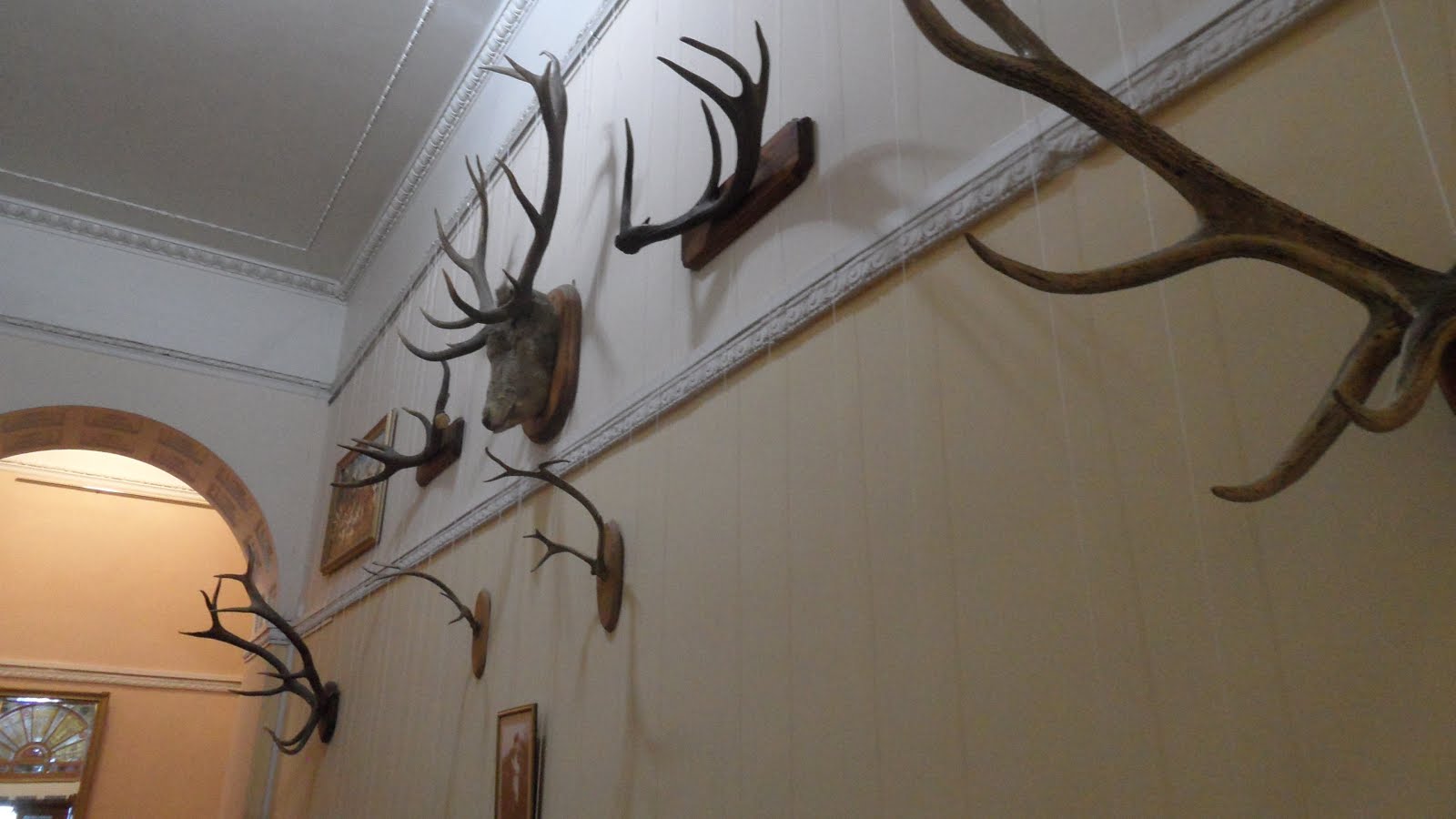

 There is a pathway which starts near the palace. Originally it was used by tsar's family. Now it leads to the Lower Oreanda Resort. This resort was used by Central Committee of the CPSU members and especially honoured men. Almost every Russian actor, a lot of writers were here. Even Korolev visited this place. The pathway is really cool. It looks like similar pathways in Kislovodsk's parks, only surrounded with southern exotic plants. I'd like to spend there more time, but as always we were in a hurry. So we ascended to the arc in the hills, and then descended to the mentioned resort. The road down is rather steep, so it was interesting.
 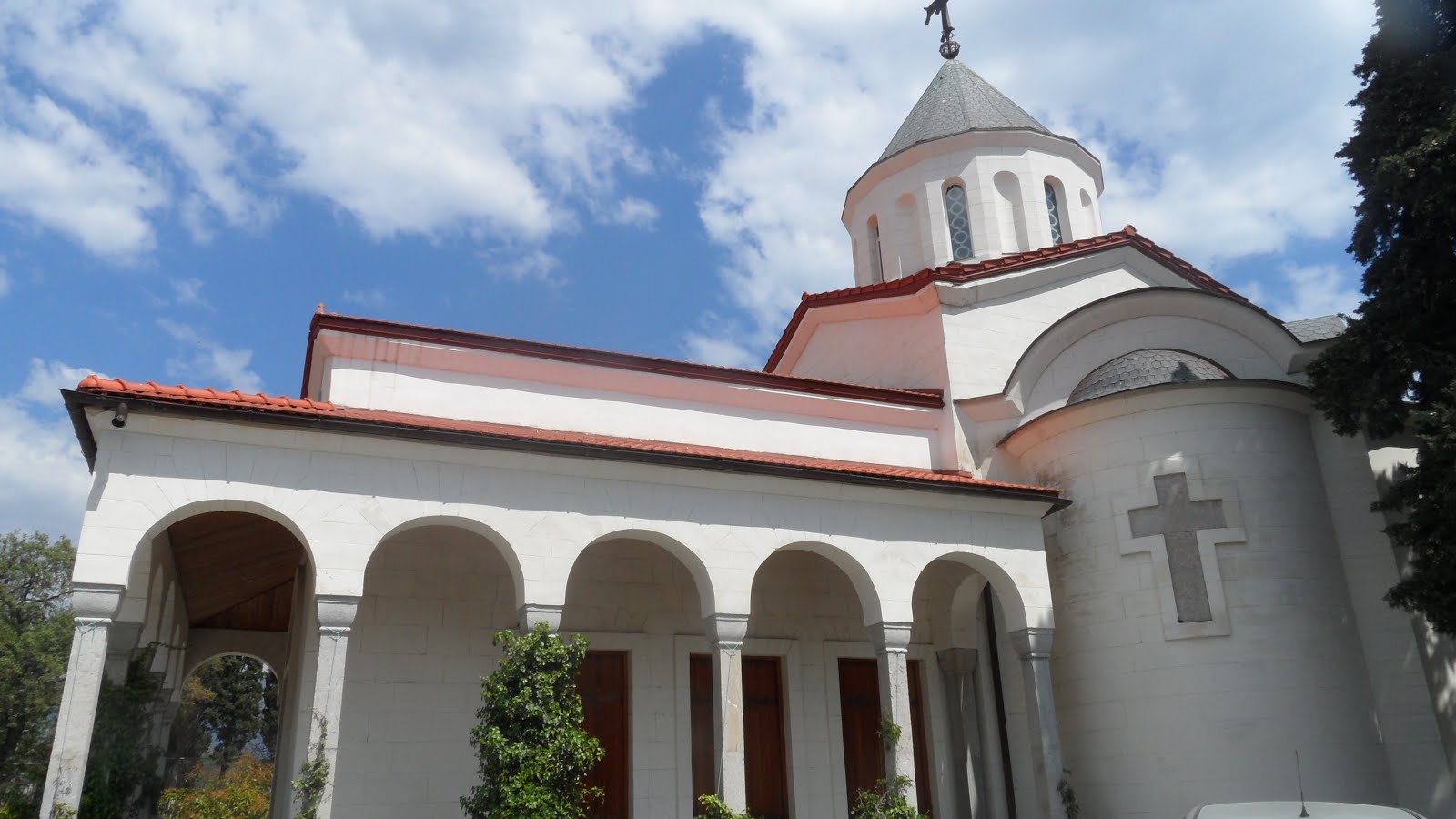 Near this resort there's a church. A priest who serves there is famous in Crimea. He writes theological and philosophical books. Also he is known, because he doesn't require payments for his wedding and memorial services.
After visiting Resort's park there was a concert of church choir music. As I barely could withstand this, I spent this time walking in the park, which looked lovely.

In the evening I forgot a packet with food in the bus, so I had to go walking, searching for a cafe. I've walked along the beach, but all cafes there were still closed or were not very attractive. Finally I've chosen one with adequate prices and interesting interior - guns, steering wheels, bear's skins. Food was delicious, but music was awful. As it was live music, they even included some margin for it in the bill. It wasn't high, but I'd prefer to pay it to these musicians for silence, not for their music.
Day 4. Vorontsov Palace. Swallow's Nest. Yalta.

 After breakfast we were going to the Vorontsov Palace. In the road the guide talked us about count Vorontsov. It was one of the richest russians of his time. But unlike modern Russian thiefs oligarhs, he spent a lot of own money on the state business - he built roads and developed cities. When after battle he lost most of his 9000 soldiers, he rebuilt one of his estates into the hospital and all of his remaining wounded soldiers were nursed there. When they recovered, he paid them significant rewards and gave everyone a fur coat (it was in winter). He has even sold another estate to cover the costs of carousing hussars in Paris when our troops were leaving it after first Patriotic War...

 In any case, his palace is great. It looks like a Medieval castle, and is made from semiprecious material. And of course, white lions are majestic. There's an English park beyond his palace, with pounds, swans and so on… It's evident that this palace was created by one of the richest man in Russian Empire. They say, Nikolay I was angry when saw this palace, as it was more beautiful than his own palaces. But the next morning he pardoned Vorontsov and asked him to oversee the building of Emperor palace nearby (Livadia palace). By the way, Vorontsov Palace was Churchill's residence during Yalta conference. It's not a big surprise, as this place resembles European castles.
 After the palace we went to the Swallow's Nest. This castle was sold several times. His last owner before the Revolution was some merchant, who wanted to make a restaurant there. In Soviet era, the castle was in pity state. It needed reconstruction. Some works were made in the mid of the century, and it was transformed into museum. Several films were shot there, including "Ten Little Niggers". Ukrainian government leased this palace to Italian company, who tried opened restaurant. They didn't know the history. After several years Ukrainian president voided the contract and turned palace into museum again. He even repaired it for state's money. They say he wanted to privatize the palace, but didn't have time to finish with his plans, as Maidan has happened. Now it's a museum again.
From Swallow's Nest we went by small ship to Yalta. In Yalta we had some free time. I even managed to have a decent dinner there for ~ 2 euro. While walking along the seafront, I've seen several concerts - they were held on the stages under clear sky. There were a lot of publice there. Some of them tried to get their money, lending different exotic personal vehicles, forcing you to take a picture with their animals or playing violins. Lively place. I was fond of several pairs of old men, playing chess on the benches. A man managed to do check-mate in 6 moves from situation, which didn't foretell it in any way.
In the evening I walked from the hotel in the direction opposite to the city center. Saw several pictures in Stalker style - abandoned children recreation centers, rusty satellite antennas, abandoned wagons…
Day 5. Genoese fortress. Vine plant.
 At 7 o'clock we left for Sudak. During our way guide talked about Alans, Greeks, Genoeses, Tatars, Turks and other nationalities, living in Crimea in different times. She even read some poems. Churches and mosques were seen along our way. In 1945 a lot of tatars were deported from these lands, and all original titles were changed in one night. So town names like Perevalnoe, Svetloe, Pionerskoe appeared. The Tatars in awful conditions, in goods wagons, were transferred to Kazakhstan.
  Sometimes we see monuments to partizans. They created a lot of troubles for fascists, but also often died. Germans burned and cut down forest, trying to secure roads for their transports, but everything was in vain.
 First event for today is Genoese fortress. However, earlier it was Byzantine fortress, and before this it was Alanian fortress. Looks great. The spirit of the place a bit resembles Tanais ruins. I'd gladly walked here for half a day, but we have only one hour. Almost whole or well reconstructed towers, walls, battlements. Hipster-style guide gives us brief information about different fortifications in the fortress. There is an interesting building in the fortress. It's a mosque, which was built by Turks, who one day came here. When they left, it became Catholic church. Later it was used as sinagoga by local Jews. This holy place now is a museum. You should appreciate that internal area of the fortress housed a small city. There were not enough Genoeses here to defend such big fortress, so during hard times either militia was used, or people have to live the fortress and the city and hide in the forest.
 Next stop is vine cellars of "Solnechnaya Dolina" vine plant. The plant produces a lot of vines, and we are told how vine is made. They say, the cost of one oak barrel for vine is about 1000 euros. If it's just cost of empty barrel, how much will full barrel cost? The cellars were founded in the end of XIX century by Golitsyn, but changed their owners rather often. Local people managed to steal vine, using ventilation holes, so in middle of the century they were locked with bars. The cellars successfully survived WWII, because one of the German high officers liked winemaking and wanted to grab the plant, but you know the history. Now plant produces a lot of vines, the main brands include "Black doctor" and "Black colonel". I wanted to get "Black doctor", as my friend liked his cheap replica, but it costed as 4-5 bottles of Abkhazian wines, so I stopped on portvein, which was cheaper.
As I forgot to buy any food during the day, I have to buy "Snickers" for the cost of the second course in the canteen where I usually eat. Another impressions on the ferry are related to the ferryboat itself. It looks grandiosely. It was interesting that ferryboat does two turns during its way so that it lands with its back part…
Epilogue
There were a lot of impressions, and most of them were positive. I saw that this region is developing with great speed. From several conversations I found out that people expect that a lot of funding will come from Moscow after 2018, when World Championship will be over and Kerch strait bridge will be finished. Of course, this bridge is a necessity, as crossing strait on the ferry takes too much time.I still haven't seen a lot in Crimea, and I'd like to go back and visit Sevastopol and Bakhchysarai, to spend several days on the sea shore.
If you decide to go there, don't forget that for now it seems only MTS mobile services work there. Also several men in our group had issues with their credit cards, so don't forget to get cash. Luckily, you'll not need a lot of money there.
вторник, 29 марта 2016 г.
Converting "linked images" zones to non-linked
A while ago we introduced "nlipkg" zone brand in OI to create "non-linked" images. OmniOS uses ipkg as non-linked brand by default and has additional "lipkg" brand for linked images. Briefly speaking, when you deal with linked images, global zone's IPS knows a lot about zones, can work with them (for example, you can update all zones in one step with "pkg update -r") and imposes some restrictions on child images.
Zone's brand is recorded in /etc/zones/zonename.xml and can be changed manually or using zonecfg. As ipkg and nlipkg zones are rather similar (in fact, they are distinguished only in name and IPS checks in some places on which brand it's operating, but for these two brands zone brand scripts are the same). So, when you are bugged with IPS checks for linked images, you can try to change zone's brand from ipkg to nlipkg. This even can work. The only issue is that it doesn't always work. Sometimes you still receive irritating messages like
pkg install: Invalid child image publisher configuration.  Child image publisher
configuration must be a superset of the parent image publisher configuration.
Please update the child publisher configuration to match the parent.  If the
child image is a zone this can be done automatically by detaching and
attaching the zone.

The parent image has the following enabled publishers:
    PUBLISHER 0: openindiana.org (non-sticky)
    PUBLISHER 1: userland (non-sticky)
    PUBLISHER 2: hipster-encumbered

The child image has the following enabled publishers:
    PUBLISHER 0: openindiana.org (non-sticky)
    PUBLISHER 1: hipster-encumbered
Even for nlipkg-branded zones. The issue is that inside zone IPS knows nothing about zone's brand. Its logic is always the same. The only thing which it checks for are files in /var/pkg/linked directory. These files are usually created on pkg operations initiated from GZ (the same pkg update -r) and contain information about parent image (read - GZ). When you change zone's brand, they will not disappear, and IPS inside zone will still think that it works with linked image. Luckily, to convince it that it's not true, it's enough to do "rm -fr /var/pkg/linked". Then this condition will make IPS happy.
So, long story short - don't forget to remove /var/pkg/linked if you convert zone from ipkg to nlipkg brand.
вторник, 22 декабря 2015 г.
Bye-bye, sysidtool, hello sysding
Often you want to have some simple tool to configure basic system settings after installation, such as ip settings, time zone settings, locales and so on. More important, installer also sometimes needs similar utility, which would run on first boot and initialize basic system parameters. For example, OmniOS runs /.initialboot script on the first boot. Solaris historically had sysidtool service, which read /etc/sysidcfg file and used it to configure zones or base system. Sysidtool also had ncurses-based interface to perform basic zone configuration.
The disadvantage of sysidtool is that it is a closed source tool, and you cannot fix it if you want it to do a bit more. So, we switched to sysding in OpenIndiana Hipster.
Sysding was originally written by Olaf Bohlen (Agnar at #oi-dev) to configure multiple illumos/Solaris zones. It doesn't have interactive interface, but has a set of utility functions to write configuration scripts. File /etc/sysding.conf is a simple ksh script, sourced by /lib/svc/method/sysding on . /lib/svc/method/sysding predefines some useful functions which can be necessary for initial configuration. Sample configuration file can look like
Using it, sysding will set timezone, locale, root password, network settings on first boot and reboot zone (or NGZ), because /etc/default/init was changed. It also cares about setting root password to 'NP' at first boot in zone if it's empty and you haven't specified one. Without this you wouldn't be able to "zlogin" to the zone. It can do a bit more. If you are interested, look at /lib/svc/method/sysding . If you want to have some customizations for your environment, create pull requests against https://github.com/OpenIndiana/sysding/, but don't forget two things: test your changes thoroughly and keep in mind that sysding was created to be a simple configuration tool.
The disadvantage of sysidtool is that it is a closed source tool, and you cannot fix it if you want it to do a bit more. So, we switched to sysding in OpenIndiana Hipster.
Sysding was originally written by Olaf Bohlen (Agnar at #oi-dev) to configure multiple illumos/Solaris zones. It doesn't have interactive interface, but has a set of utility functions to write configuration scripts. File /etc/sysding.conf is a simple ksh script, sourced by /lib/svc/method/sysding on . /lib/svc/method/sysding predefines some useful functions which can be necessary for initial configuration. Sample configuration file can look like
setup_timezone Europe/Moscow
setup_locale en_US.UTF-8
setup_user_password root '$5$+Fu+utqXFqU=$RD2LbFipqwKc2srNFYnVkda9U6K2pmMajvuR3iyHzR'
setup_interface PRIMARY v4 192.168.1.4/24
setup_route default 192.168.1.1
setup_ns_dns "stud.lan" "stud.lan notebook.lan" "8.8.8.8"
Using it, sysding will set timezone, locale, root password, network settings on first boot and reboot zone (or NGZ), because /etc/default/init was changed. It also cares about setting root password to 'NP' at first boot in zone if it's empty and you haven't specified one. Without this you wouldn't be able to "zlogin" to the zone. It can do a bit more. If you are interested, look at /lib/svc/method/sysding . If you want to have some customizations for your environment, create pull requests against https://github.com/OpenIndiana/sysding/, but don't forget two things: test your changes thoroughly and keep in mind that sysding was created to be a simple configuration tool.
среда, 18 ноября 2015 г.
Materials for Unix courses
https://drive.google.com/folderview?id=0B5aSh2tKvpqDdkVQM2Uzbnp2eVE
(Yes, I needed some fast way to share link :))
среда, 7 октября 2015 г.
Userland incorporation in OpenIndiana Hipster and what does it mean for developer
Last Sunday we've published userland incorporation to /hipster-2015 repository. This was a feature long asked for by several users. It is generated by Jenkins on the build host and forces all packages generated by oi-userland build (excluding illumos-gate-provided packages and kvm) to be the latest. As we publish this incorporation on each oi-userland rebuild, you can force your system to go to specific point in the future. For example:
We can see that this system has incorporation with 20151004T163056Z timestamp installed and two more recent versions are available. So I can do something like:
to move to the 5th October package versions.
Why developers doesn't like incorporations (and IPS generally)? Because it doesn't allow you to do what you want with your system. For example, you can't install another package version.
In case of userland incorporation, you have some freedom. You can just uninstall it (and entire, as entire depends on userland-incorporation). But you can get issues during new zone setup if your NGZ misses entire. So, you have three options:
Let's look on the last option more attentively. For example, I'm going to experiment with new mesa. But userland-incorporation has the following dependency:
As you see, it is marked by facet. So you can do
Firstly, you have to install mesa version offered by openindiana.org publisher.
Update (2016-01-26). If you use your host as test station, it's easier just to uninstall userland-incorporation. Now you can do this without touching entire. Just do
$ pkg list -avf pkg://openindiana.org/consolidation/userland/userland-incorporation
FMRI                                                                         IFO
pkg://openindiana.org/consolidation/userland/userland-incorporation@0.5.11-2015.0.2.0:20151006T203007Z ---
pkg://openindiana.org/consolidation/userland/userland-incorporation@0.5.11-2015.0.2.0:20151005T203207Z ---
pkg://openindiana.org/consolidation/userland/userland-incorporation@0.5.11-2015.0.2.0:20151004T163056Z i--
pkg://openindiana.org/consolidation/userland/userland-incorporation@0.5.11-2015.0.2.0:20151004T150924Z ---
pkg://openindiana.org/consolidation/userland/userland-incorporation@0.5.11-2015.0.2.0:20151004T132353Z ---
pkg://openindiana.org/consolidation/userland/userland-incorporation@0.5.11-2015.0.2.0:20151004T122350Z ---
pkg://openindiana.org/consolidation/userland/userland-incorporation@0.5.11-2015.0.2.0:20151004T095518Z ---
....
We can see that this system has incorporation with 20151004T163056Z timestamp installed and two more recent versions are available. So I can do something like:
$ sudo pkg update -v \
pkg://openindiana.org/consolidation/userland/userland-incorporation@0.5.11-2015.0.2.0:20151005T203207Z
to move to the 5th October package versions.
Why developers doesn't like incorporations (and IPS generally)? Because it doesn't allow you to do what you want with your system. For example, you can't install another package version.
In case of userland incorporation, you have some freedom. You can just uninstall it (and entire, as entire depends on userland-incorporation). But you can get issues during new zone setup if your NGZ misses entire. So, you have three options:
- stay with old entire, which doesn't depend on userland-incorporation (pkg freeze it);
- uninstall entire and userland-incorporation;
- use facets to relax incorporate dependencies.
Let's look on the last option more attentively. For example, I'm going to experiment with new mesa. But userland-incorporation has the following dependency:
$ pkg contents -m userland-incorporation |grep mesa
depend facet.version-lock.x11/library/mesa=true fmri=x11/library/mesa@10.5.9,5.11-2015.0.1.0:20150927T212600Z type=incorporate
As you see, it is marked by facet. So you can do
$ sudo pkg facet facet.version-lock.x11/library/mesa FACET VALUE SRC version-lock.x11/library/mesa True system $ sudo pkg change-facet facet.version-lock.x11/library/mesa=false $ sudo pkg install pkg://userland/x11/library/mesa $ sudo pkg info mesa Name: x11/library/mesaBut beware, if you would like to change facet back, you can't do it:
Summary: The Mesa 3-D Graphics Library
Category: System/X11
State: Installed
Publisher: userland
Version: 11.0.2
Branch: 2015.0.1.0
Packaging Date: October 7, 2015 03:00:58 PM
Last Install Time: October 7, 2015 06:49:24 PM
Size: 34.82 MB
FMRI: pkg://userland/x11/library/mesa@11.0.2-2015.0.1.0:20151007T150058Z
Project URL: http://www.mesa3d.org/
Source URL: ftp://ftp.freedesktop.org/pub/mesa/11.0.2/mesa-11.0.2.tar.xz
$ sudo pkg change-facet version-lock.x11/library/mesa=true
Creating Plan (Solver setup): /
pkg change-facet: Package entire must be uninstalled before the requested operation can be performed.
  Reject:  pkg://openindiana.org/entire@0.5.11-2015.0.2.1:20151003T221212Z
  Reason:  No version matching 'require' dependency consolidation/userland/userland-incorporation can be installed
Package x11/server/xorg/driver/xorg-video-ati must be uninstalled before the requested operation can be performed.
  Reject:  pkg://openindiana.org/x11/server/xorg/driver/xorg-video-ati@6.14.6-2015.0.1.0:20150927T212825Z
  Reason:  No version matching 'require' dependency x11/server/xorg@1.14.7-2015.0.1.0 can be installed
    ----------------------------------------
    Reject:  pkg://openindiana.org/x11/server/xorg@1.14.7-2015.0.1.0:20150927T184317Z
    Reason:  No version matching 'optional' dependency x11/library/mesa@7.4.4-2014.1.3.0 can be installed
      ----------------------------------------
      Reject:  pkg://userland/x11/library/mesa@11.0.2-2015.0.1.0:20151007T150058Z
      Reason:  This version is excluded by installed incorporation consolidation/userland/userland-incorporation@0.5.11-2015.0.2.0
      ----------------------------------------
    ----------------------------------------

.....
Firstly, you have to install mesa version offered by openindiana.org publisher.
Update (2016-01-26). If you use your host as test station, it's easier just to uninstall userland-incorporation. Now you can do this without touching entire. Just do
$ sudo pkg change-facet facet.require.consolidation/userland/userland-incorporation=false
$ sudo pkg uninstall userland-incorporation
Подписаться на:
Комментарии (Atom)